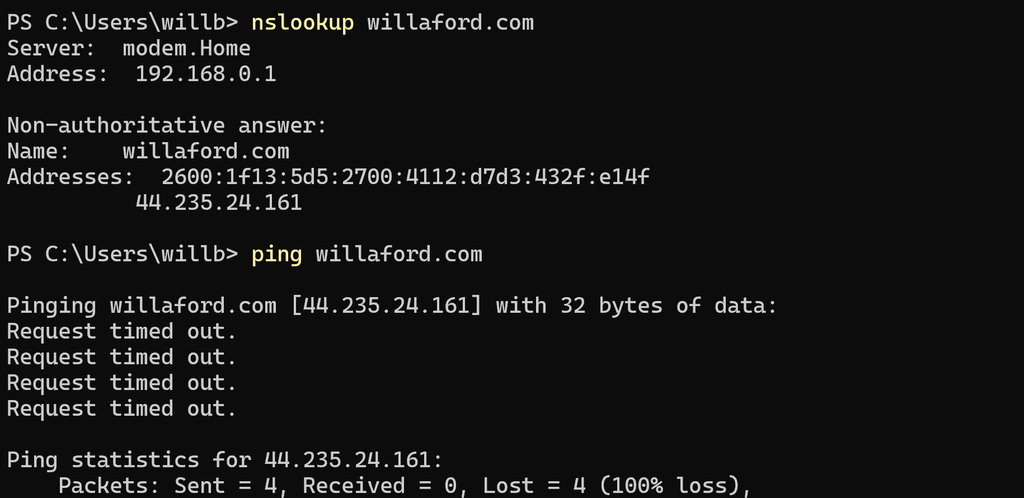
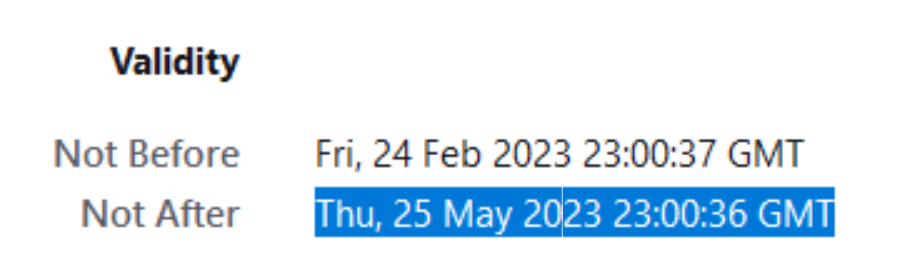
Yes, Lightsail wants to hold the DNS zone. Setting the nameserver to the lightsail NS fixed the split brain, allowing Lightsail to understand that StaticIP2 == StaticIP2 long enough to set the Let’s Encryp SSL/TLS certification
What remains to be seen is whether this breaks the mail routing. Wait, as I’m editing, I see “updating failed, could not get a valid response from the server… I wonder”
Haha — now Site took too long to respond. Maybe I celebrate too soo
nslookup willaford.com
But load willaford.com in a browser, and everything works. OK. Let’s check email from the wordpress admin console.
Email not working, then site not working again.
Change something [anything, just click some buttons…really {not really, but I forgot what clicked}] and site starts working.
Checking email again: no evidence of success, no evidence of failure.
Manual update of the static routes for willaford.com and wordpress.willaford.com are successful.
ToDo:
Manually update the static routs for .net, .me, .org etc. [DONE]
Snapshot the instance [DONE]
Troubleshoot HTTPS
What is the problem?
What have we done about it?
We have moved the static ip.
What do we need to do about it?
DNS TTL should have already expired, but I don’t know how many intermediate caches are involved. Wait a day, and start again. EttasDiaries have a different setup and may be easier.
Ettas Diaries? Yes, do the whole thing again. However, DNS routing for Etta’s diaries is wholly on the lightsail hosted zone, so config should be easier. let’s see.
Create new instance, import
Attach domain: ettasdiaries .com and .org and ettaschronicles
Check the firewall rules — back to the console, again. Careful! You must to to the instance, then the networking tab. Going to the networking section of lightsail then selecting the instance gives you something *very* different. OK. Yes, 22, 80, 443 are all configured.
I think we are going to have issues with lightsail domains conflicting with existing Route53 Configuration. Checking.
OKAY — going back and swapping in the static IP in raw DNS config in route53. Manual change. No CDK, pipeline, MCM or checklist
at 5:36 PM Pacific Time 22 October 2026, William decided to use the sharpest tool on the internet [dns] without guardrails.
Testing the change by saving this and reloading from willaford.com. Expected result is non-secure [no https] routing to this location.
Notably, the old instance does not have this update. willaford.net and willafor.org will resolve to the old instance until those are changed.
deleted hundreds of spam comments in the pending queue
Noticed that the php version needs an update — that is annoying, because I think I will get stuck at lightsail again (just add a new instance…). Adding a new instance only works if you have offboarded the database, which I have not done for this installation.
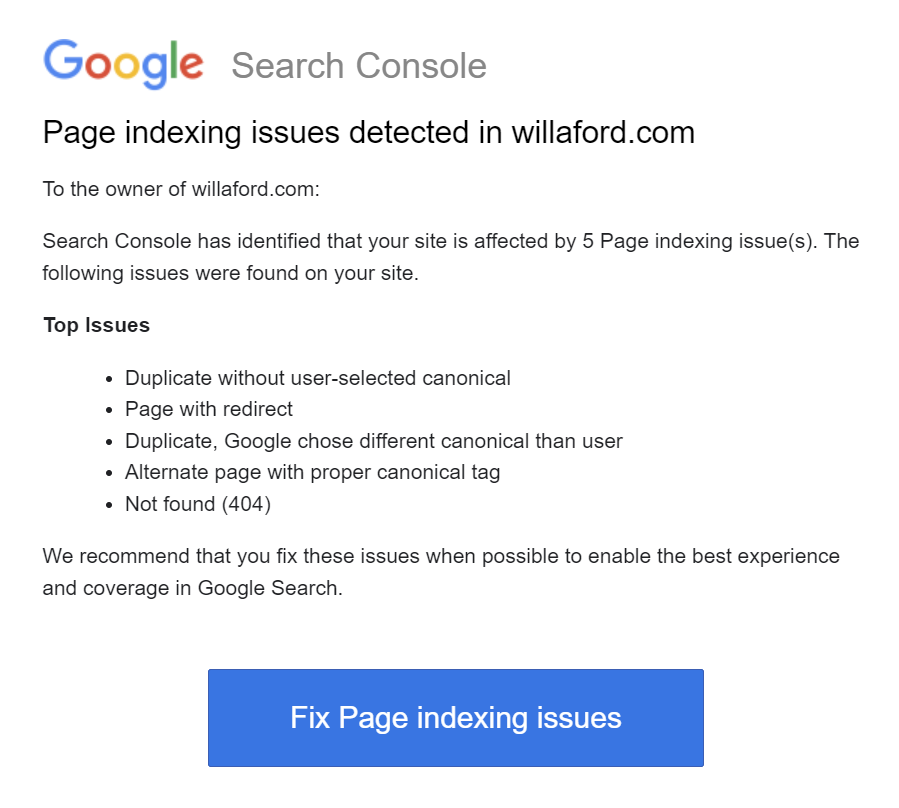
I received the following mail for each domain routing to this website (.com, .net, .me, .org)
Duplicate without user-selected canonical
Page with redirect
Duplicate, Google chose different canonical than user
Alternate page with proper canonical tag
Not found (404)
What have I done about it?
I have started this post. Before starting this post I created a template post with the problem solving template. I practiced using “copy all blocks” in WordPress when creating this post.
What do I need to do about It?
I need to click the link to Fix Page indexing issues and figure out the rest of this list
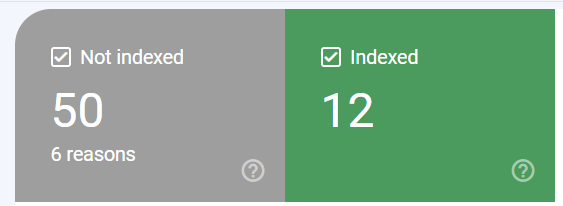
As I write this post, I have yet to investigate. I suspect that changing that the recent update to certificates had side effects. Specifically, the main url changed form willaford.com to 44.235.24.161/. This site is references on four domains. I used all defaults when setting up google analytics and search indexing, without specifying a canonical URL. I've clicked the link, and see a help reference, so I am reading the reference, starting with the non-experts usage guide. Unhelpful for the specific issues, but nice to know that Google sent me four error mails even though “if your site has fewer than 500 pages, you probably don’t need to use this report.” The dashboard is more helpful, telling me that 12 pages are indexed, and 50 pages are not indexed.
Determine which pages are indexed and which are not indexed
I wonder what is behind the ? icon — tooltip is unhelpful. Survey the dashboard, find the link that says "view data about indexed pages" and click it. Examples include all the main site, about, contact, posts, all listed behind wordpress.willaford.com and 44.235.24.161/. None listed behind willaford.<domain>
Find out how to confirm the premise of what is unindexed.
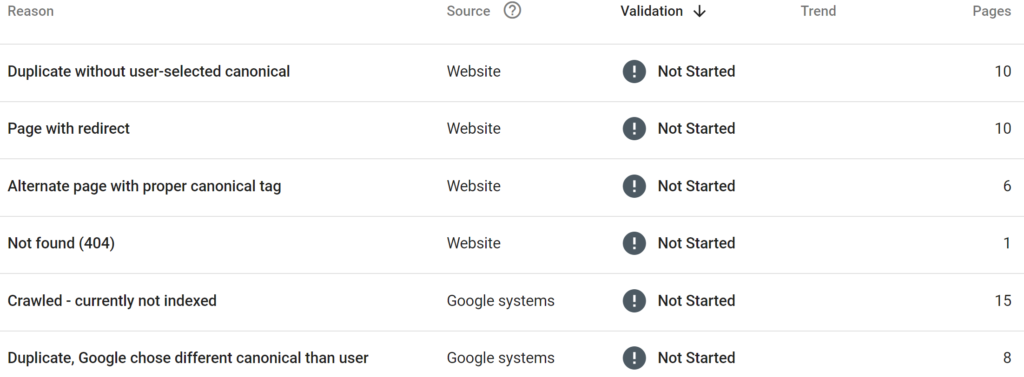
Premise: .me, .com, .net, .org need some configuration to be indexed. How do I do that? Starting with this table, what happens if I follow “Not Started”
Clicked the link, found another graph with a help link.
Aha! “if you think that Google has chosen the wrong URL as canonical, you can explicitly mark the canonical for this page” Uh-Oh! If you use…WordPress…go down the rabbit hole for setting canonical elements on wordpress
This will take some time. Search for anything that could possibly sound like a how-to. You will see results from everybody with something to sell, and you will see results from everyone referencing somebody else’s content seeking to monetize the their content with an affiliate link to something to sell. If it is for wordpress, then the links will include plugins. What I am looking for is instructions for how to set it for the site, preferrably direction, or as second choice, with an EOM plugin rather than 3rd party. Found a 2019 reference to editing the header.php file directly (with instructions for multi-site and single site). Found lots of references to various plugins. Lot’s of references to Yoast.
What is Yoast?
Yoast (https://yoast.com/) has WordPress options ranging from Free, to $$, to $$$. Let’s start with Free and see how many hooks are attached. First question — Is Yoast lying to me (and themselves). My identify and user data has value. Any plugin that requires identification and/or User Data is by definition Not Free.Privacy Policy shows an EU-based company, so GDPR is in place, but doesn’t specify what data is collected when using the Free Plugin. Public references seem clean (https://en.wikipedia.org/wiki/Yoast_SEO and others)
Install Yoast Free plugin
Search for plugins in wordpress config, install, activate. Success so far, no requests for personal info. Following link to configuration…yep, there’s the upsell for Premium in header, footer, and sidebar, but the center block still seems clean. A bit wordy and markety, but not skeevy. Personal Preferences has the winner, and I am smiling now: “If you’re using Yoast SEO free, usage tracking is only on when you explicitly opt-in. ” Following basic configuration and everything says “good” but nothing references canonical. How do I know if it worked?
Figure out if it did anything
Using the Google URL Inspector on https://willaford.com/about I find that “URL is not on Google” Search help on Yoast and find that I can set the canonical per page or post while editing. Test on hello-world (set at www.willaford…) and inspecting source after reload find that it is successful. Test on “about” and find that the overall site is vending wordpress.willaford.com.
Change some stuff and do it again
Going to each page (not post, page) and setting 44.235.24.161/ as canonical. I will use an earlier post today as the test case
Back to the top — why not simply change headers.php?
Seems like there should be a better way. When I ran bncert I got certifications for all of the domains, so I think they should be covered with no need to rerun. For future WordPress installs I need to think about canonical on initial config (this wasn’t in mind when I created this the first time). So, using the AWS console, navigate to lightsail and connect to the wordpress instance. Then find header.php. Ugh, skip that. the header is per theme [really?!]. OK, now I’m into the config files and want to avoid direct edit. Maybe I can do this with wp cli but first, what does the config file say?
That is particularly unhelpful, unless you know what the HTTP_HOST is. OK, not really so unhelpful, this is simply telling me that I’m getting defaults. Let’s change this and see what happens. Backup wp-config.php. Publish this work-in-progress post. <PAUSE HERE> From the console, snapshot the instance. <COMING BACK to EDITING> From the command line:
Command succeeds, but nothing changed. It turns out that Jetpack is giving the same error as Google, and give simple, direct, specific feedback on how to fix it — edit wp-config.
Retest — are we done yet? Check on Google, Check on Yoast, Check on Jetpack
Restarted Validation on Google — will recheck later, but google sitekit requires a reconnect.
Deactivating Jetpack — I have plans to pay, and there is no way to dismiss the upsells, and the upsells obscure the basics. Feels like Norton and makes we wonder if the fix is worse than the cure. No, I don’t want your protection just because I want your SEO. No, I don’t want your threats. What, I can’t dismiss, now you’re the threat (no, this isn’t awareness marketing, it is a threat. I presume that any software I’m loading is a thread and presume that your company is a threat until proven otherwise. If you assume I don’t already know that and try to convince me that <something else is a threat> than I presume you are indeed the attack vector). Deactivate. Uninstall. Blocklist from list of companies I want to do business with.
The overall problem has two parts. The first problem is the lack of resiliency and repeatability for this website construction. This website is hosted in an AWS account configured manually using the console. This website operates with zero resiliency, starting with zero backup, zero recreatability, single host, single region, single zone, local storage only. The underlying account uses hand-managed IAM credentials. The second problem is that I currently lack the knowledge and have yet to build the skills necessary to solve the first problem.
What have I done about it?
I have written a problem statement. “<collaboration notes> are ephemeral; problem statements are forever.” (William Willaford, circa 2016) I have identified training material for AWS concepts (see AWS Skillbuilder), and have started ingesting this material. I have identified a set of projects related to the SkillBuilder courses to accelerate learning in areas needed to rebuild this site resiliently.
What do I need to do about it?
I need to setup a local (or cloud) development environment that is redeployable at need and/or remotely accessible. For example, if local, the environment needs to be synchronized between my home desktop and my travel laptop. If cloud-based, then it needs to be redeployable for instance replacement, and remotely accessible from each working machine.
I need to establish identity management that enables AWS CLI from local development environments and cloud environments.
I need to isolate management of this website from my development and training environment.
I need to practice setting up infrastructure using the AWS CLI and CFN.
Tried and tested on 6 June 2023. bncert found the existing cert for all of the domains, updated the cert, set a cron job 🤞 for renewal, updated server config, and rebooted. The manual steps were snapshotting the instance before starting, getting latest version of bncert tool, and typing in the domains
Also, practice posting YouTube content via WordPress. From the wordpress instructions: “To add the YouTube block, click on the + BlockInserter icon and search for “youtube”. Click it to add the block to the post or page.”
Layer organic lasagna back into the hole. Some may consider this not truly a lasagna garden because I dug a hole rather than using no-dig methods. I think of this as scraping away the unhealthy top layer left by former garage, sidewalk, and driveway construction. By going back to the original starting layer, the lasagna is started at a level that is both immediately productive for plant growth, and provides soil amendment beyond the dig depth, thus preparing the ground for the future needs of the growing root structure.
Remove excess fill to the dry shade garden [under the pierus, rhododendron, and camellia]. This also provides amended infill in an area previously damaged the foundation build for the gazebo put in by the prior owner.
Plant the beautyberry. This is the main thing. Three days of hard labor on a Memorial Day weekend so that we could take a plant out of plastic pot and put it into dirt.
Along the way, play with the dog, sharpen some shovels and a pickax, sweep everything a few times. This is the real main thing. Quality time together. Acts of service. Leave the space better than you found it. Live.